> For the complete documentation index, see [llms.txt](https://documentation.bonsaidata.io/llms.txt). Markdown versions of documentation pages are available by appending `.md` to page URLs; this page is available as [Markdown](https://documentation.bonsaidata.io/resources/onboarding/business-data-and-point-of-sale-pos-requirements.md).
# Business Data & Point of Sale (POS) Requirements
To accurately measure marketing performance and connect it to real business outcomes, Bonsai requires access to your Business data such as Point of Sale (POS), Online Orders, and/or In-store orders.
This document outlines what data is needed, why it matters, and how to prepare it — whether your data lives in Azure SQL, Snowflake, BigQuery, Redshift, or another data warehouse.
***
### **Overview**
Bonsai uses your business data to connect customer actions (seen in your analytics platforms like GA4) with business outcomes (recorded in your POS or order management systems).
This enables:
* **Multi-Touch Attribution (MTA):** attributing revenue to the marketing interactions that led to it.
* **Incrementality Measurement:** quantifying the lift caused by marketing campaigns.
* **Customer Insights:** tracking lifetime value (LTV), retention, and cross-channel behavior.
To make this work, Bonsai needs transaction-level data that can be matched to your marketing analytics data using a **shared unique identifier** (such as a transaction\_id or order\_id).
***
### **How Marketing & Business Data Connect**
When a customer completes a purchase — online or in-store — the transaction ID should appear in both:
1. Your business data (e.g., POS, CRM, or OMS systems), and
2. Your analytics data (e.g., GA4, Adobe Analytics, etc.) via a “purchase” or “business outcome” event.
Bonsai uses this shared ID (sometimes referred to as a cookie match dimension) to tie web and ad interactions to real sales.
Without this shared key, marketing touchpoints and sales data remain disconnected — making true ROI analysis impossible.
{% hint style="info" %}
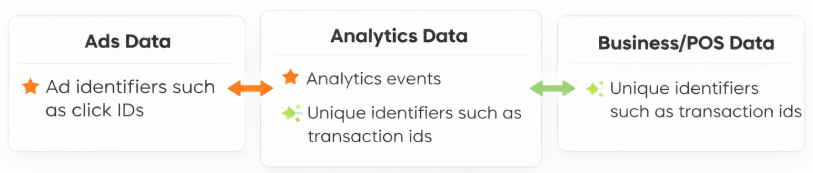
Bonsai uses analytics data as a linking layer between advertising platforms and business or POS systems. Ad identifiers such as click IDs are first matched to analytics events, and a separate unique identifier is then used to connect analytics data to downstream revenue or POS records. Bonsai does not join advertising data directly to point-of-sale systems — analytics serves as the intermediary that enables accurate attribution and measurement.
{% endhint %}
***
### **Data Domains & Requirements**
POS and order data is typically organized into several domains. The schemas below are platform-agnostic examples of the fields Bonsai uses to support measurement, modeling, and attribution.
**Order Level Sales is required** for Bonsai products and represents the minimum dataset necessary to enable core attribution and modeling workflows. The required fields may be delivered as a single table or distributed across multiple tables, provided keys and relationships are maintained.
All additional domains (e.g., Sales Detail / Line Items, Customer, Retail Store) are optional and enable enhanced functionality and reporting, including:
* Product-level attribution and SKU/service performance (requires Sales Detail)
* Audience Analytics and customer segmentation (requires Customer)
* Store/location-level reporting and geographic cuts (enhanced by Retail Store)
**Privacy / PII Handling**
Bonsai does not require raw personally identifiable information (PII) values. If preferred, PII fields (e.g., email address, phone number, street address) may be anonymized prior to delivery. Bonsai supports hashed identifiers (SHA-256 or SHA-512 preferred) for privacy-preserving identity matching. Contact your Bonsai Customer Engineer to align on hashing standards and expected formats.
#### **1. Order Level Sales**
Represents each unique transaction or order.
| Field | Required | Description | Example |
| ------------------------- | -------- | ------------------------------------------------------------------------- | ----------------------------- |
| **transaction\_id\*** | Y | Unique ID for the transaction/order | 2025-05-22-ATL-000982 |
| **store\_zip** | N | Store location: can be zip, dma, city, state | 06831 |
| **store\_id** | N | Unique store or location id for the business | store123 |
| **customer\_id** | Y | Links to customer table (nullable) | CUST-9981 |
| **customer\_zip** | Y | Customer location: can be zip, full address, city, state | 123 Main Street, Chicago, IL |
| **customer\_phone** | Y\*\* | Customer phone number | 800-300-9089 |
| **customer\_phone2** | N | Alternative customer phone number | 800-400-2356 |
| **transaction\_datetime** | Y | Timestamp of sale (UTC) | 2025-05-22T19:45:00Z |
| **updated\_at** | Y | Timestamp of when the sale or transaction status or customer data changed | 2025-06-22T18:45:00Z |
| **subtotal\_amount** | Y | Total before tax/discount | 350.00 |
| **discount\_amount** | Y | Total discounts applied | -10.00 |
| **tax\_amount** | Y | Tax collected | 21.00 |
| **total\_amount** | Y | Final transaction total | 361.00 |
| **payment\_type** | N | Tender method (cash, credit, gift card, etc.) | Credit Card |
| **status** | Y | Transaction status | Completed / Voided / Returned |
\*Commonly used as the connection between your analytics (GA4) data and point of sales/transactions. This may be called something different depending on the business.
\*\*Phone numbers are only required for businesses that rely on call tracking or phone-based lead attribution (e.g., service or appointment-driven businesses). For retail or e-commerce businesses where purchases occur directly online or in-store, phone fields are optional.
#### **2. Sales Detail (Line Item Level)**
Breaks down each order into its component products or services.
| Field | Required | Description | Example |
| -------------------- | -------- | ----------------------------------- | --------------------- |
| **transaction\_id** | Y | Foreign key linking to Sales Header | 2025-05-22-ATL-000982 |
| **line\_id** | N | Unique line within the transaction | 1 |
| **sku\*** | Y | Product SKU | TIRE-A123 |
| **quantity** | Y | Units sold | 4 |
| **unit\_price** | Y | Price per unit | 80.00 |
| **line\_discount** | Y | Discount at item level | 5.00 |
| **extended\_amount** | Y | Quantity × unit price | 320.00 |
\*This can be a traditional product SKU (retail inventory item) or a service identifier for non-inventory line items (e.g., labor, installation, membership, diagnostic fee).
#### **3. Customer**
Captures the buyer’s identity and key attributes.
| Field | Required | Description | Example |
| ------------------ | -------- | ----------------------------- | ------------------------ |
| **customer\_id** | Y | Unique ID per customer | CUST-8821 |
| **customer\_name** | N | Customer name | John Doe |
| **email** | Y | Customer email | 9b74c9897b... |
| **phone\_number** | Y | Customer phone number | 800-330-9089 |
| **phone\_number2** | N | | |
| **address** | Y | Customer address | 123 Main St, Chicago, IL |
| **postal\_code** | Y | Customer ZIP or postal code | 63110 |
| **created\_at** | N | Customer record creation time | 2023-02-05T00:00:00Z |
**Privacy Note:**\
If hashed or anonymized identifiers are preferred for compliance and security (SHA-256 or SHA-512 is preferred), please reach out to your Bonsai Customer Engineer to share which hash function you use.
#### **4. Retail Store**
Details for each retail location.
| Field | Required | Description | Example |
| ------------------ | -------- | ---------------- | ---------------- |
| **store\_id** | Y | Unique store key | STL01 |
| **store\_name** | Y | Store name | Bonsai - Chicago |
| **store\_zip** | Y | Zip code | 60007 |
| **address\_city** | Y | City | Chicago |
| **address\_state** | Y | State | IL |
***
### **Data Delivery Guidelines**
Bonsai’s preferred method for onboarding business data is through our prebuilt Connect Cards, which provide secure, out-of-the-box integrations for most major cloud data warehouses and business systems. Please review the Business Point of Sale Connect Cards to begin onboarding your data.
If you have a preferred method of data sharing, Bonsai can share Google Cloud Storage Bucket or Google Big Query table destination information for data transfers.
**Preferred cadence:** Daily incremental loads\
**Required history:** At least 24 months\
**Minimum viable dataset:** Order Level Sales
***
### **Data Quality & Validation**
Bonsai requests raw, untransformed data to ensure full transparency and control over joins, transformations, and validations. Clients are encouraged to review the validation checklist and provide a data dictionary or lookup table with key field definitions and business logic notes. This enables accurate validation during the proof-of-concept build. Once the initial connection is complete, Bonsai automates all data ingestion and quality checks, requiring no ongoing client effort.
Bonsai validates all incoming data against a core checklist:
| Category | Validation Item | Action | Expected Outcome |
| ------------------------------ | --------------------------- | ------------------------------------------------------------------------- | -------------------------------------- |
| **Incremental Logic** | Incremental Key Present | Identify columns used for delta loads (updated\_at, modified\_date, etc.) | Key consistently populated and updated |
| | Incremental Key Behavior | Identify column updates on inserts/updates (no nulls or static values) | Timestamp updates on all modified rows |
| **Data History** | History Coverage | Earliest and latest transaction dates | ≥ 24 months available |
| | Archive Data | Check if history tables exist beyond live data | Archive accessible if needed |
| **Volume Profiling** | Average Daily Volume | Count of daily transactions | Consistent daily volume; note peaks |
| | Volume Consistency | Identify outliers (batch imports, missing days) | No unexplained gaps/spikes |
| **Reconciliation** | Reconciliation Method Known | Client’s internal totals process (register, ERP, etc.) | Reconciliation source identified |
| | Daily Totals Match | Bonsai-calculated totals vs client control totals | Within ±0.1% variance |
| **Timezone Standardization** | Timestamp Source | Determine if timestamps are UTC or local | Timezone clearly defined |
| | Normalization Plan | Plan for UTC normalization | UTC normalization strategy confirmed |
| **PII Handling** | Sensitive Columns | Inspect Customer data for names, emails, phones | |
| | Hash Verification | Validate hash pattern and determinism, if applicable | SHA-256 or equivalent confirmed |
| **Status & Transaction Flags** | Status Field Present | Check for Completed, Voided, Returned flags | Status column exists and consistent |
| | Returns Handling | Identify how returns are logged (negative, linked, or separate) | Return logic documented |
| **Financial Metrics** | Margin % | Verify cost or margin fields (margin\_pct, cost\_amount) | Present and logical (0–90%) |
| | Mechanical Margin % | For service clients, check labor/service margin | Present and logical if applicable |
| | Tax & Discount Logic | Verify tax\_amount, discount\_amount formulas | Totals reconcile to invoice header |
| **Data Relationships** | Foreign Keys Valid | Confirm joins: SalesDetail → SalesHeader → Customer/Store | ≥99.9% join coverage |
| | Null Keys | Identify orphaned or missing FK values | Minimal or no nulls in key fields |
| **Data Freshness** | Latest Transaction Date | Check most recent transaction\_datetime | Data ≤ 24h old |
| | Update Frequency | Confirm daily/hourly ingestion feasible | Agreed frequency documented |
| **Schema & Field Standards** | Data Types Consistent | Verify type alignment (e.g., decimal vs int) | Matches expected schema |
| | Naming Conventions | Confirm lowercase + underscores naming pattern | Consistent and documented |
| **Discounts & Promotions** | Discount Source | Identify where discounts are stored (header, detail, promo table) | Confirm structure and logic |
| | Promo Codes | Check for promo\_id or promo\_code linkage | Fields present and valid |
| **Store Metadata** | Store Info Complete | Confirm store\_id, store\_name, region, timezone | All stores covered with metadata |
| | Region Consistency | Verify region and timezone alignment | Stores grouped correctly |
| **Completeness & Quality** | Null / Blank Checks | Identify columns with excessive nulls | <5% null rate on required fields |
| | Duplicate Keys | Detect duplicates in transaction\_id, line\_id, customer\_id | No duplicates in key fields |
| **Documentation** | Data Dictionary Provided | Confirm client provided schema reference | Available and up to date |
| | Business Rules Confirmed | Document how returns, voids, discounts work | Notes captured for modeling |
***
**Need Help?**\
Reach out to your Bonsai Customer Engineer for a quick data readiness review.
---
# Agent Instructions
This documentation is published with GitBook. GitBook is the documentation platform designed so that both humans and AI agents can read, navigate, and reason over technical content effectively. Learn more at gitbook.com.
## Querying This Documentation
If you need additional information that is not directly available in this page, you can query the documentation dynamically by asking a question.
Perform an HTTP GET request on the current page URL with the `ask` query parameter, and the optional `goal` query parameter:
```
GET https://documentation.bonsaidata.io/resources/onboarding/business-data-and-point-of-sale-pos-requirements.md?ask=&goal=
```
`ask` is the immediate question: it should be specific, self-contained, and written in natural language.
`goal` is optional and describes the broader end goal you are ultimately trying to accomplish on behalf of the user. GitBook uses it to tailor the answer towards what is most useful for that goal.
The response will contain a direct answer to the question and relevant excerpts and sources from the documentation.
Use this mechanism when the answer is not explicitly present in the current page, you need clarification or additional context, or you want to retrieve related documentation sections.